
This guide helps working content creators on YouTube, TikTok, and Instagram nail data-driven tactics that boost Shorts views. You'll get specific targets, timeframes, and tool-driven workflows to double view counts within 24–48 hours. Save time troubleshooting by applying proven benchmarks for retention, hooks, editing, and publishing.
Table of Contents
Category Hub: YouTube Shorts
Retention Benchmarks That Boost YouTube Shorts Views
Hitting 70–90% completion on 20–40 second Shorts can double view count within a day. When you zero in on retention loops and completion metrics, you tap into YouTube’s fastest distribution lever.
Completion Rate Targets by Video Length
Recommended completion rate benchmarks for different Shorts durations based on algorithmic impact
| Duration | Target Completion Rate |
|---|---|
| 20 s | 75–85% |
| 30 s | 70–80% |
| 40 s | 65–75% |
To Measure Your Baseline:
- Open YouTube Analytics and select your last ten Shorts.
- Under Engagement, filter to Completion Rate.
- Note the average percentage viewed and compare to the table above.
- Identify clips missing the target by 10% or more.
- Plan one test—trim a second or swap in a punchier hook—to hit the benchmark.
Infographic Insights
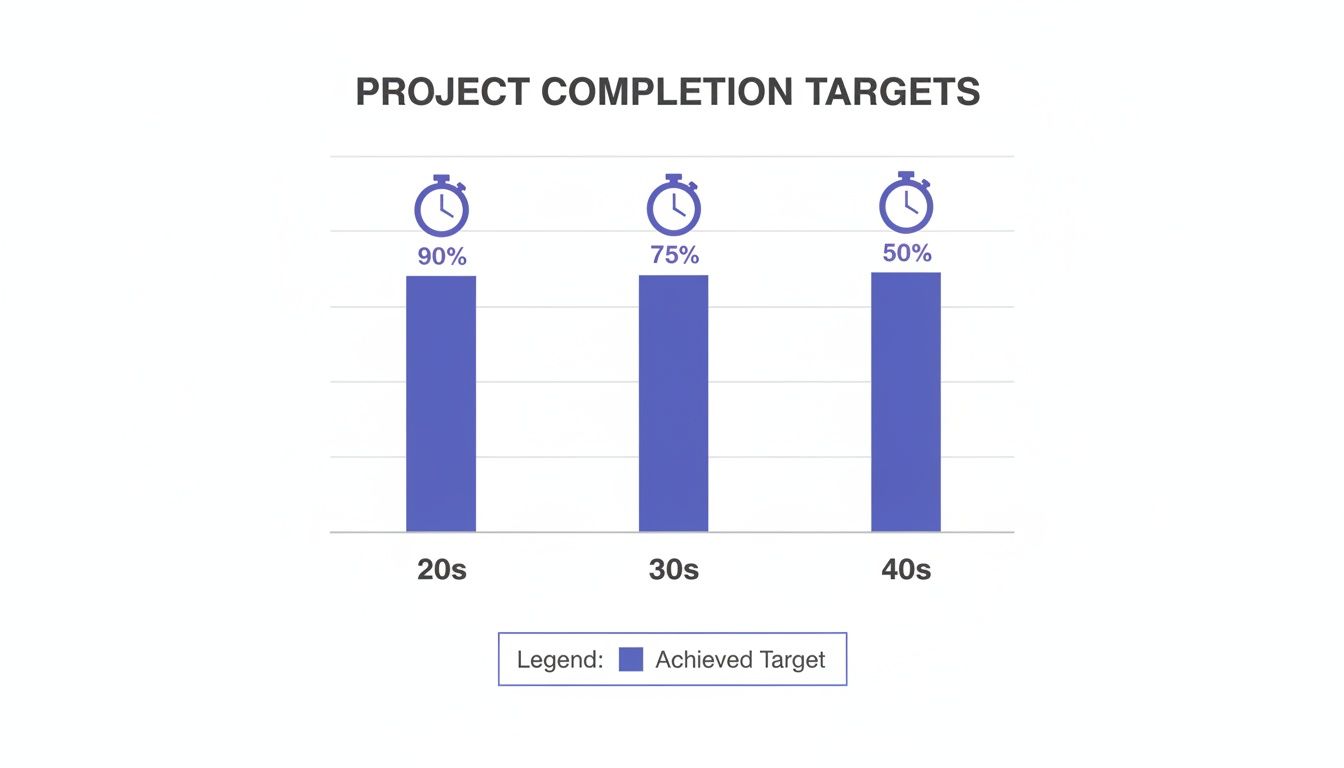
Increasing a 30 s Short’s completion from 70% to 80% yields roughly a 2× distribution lift. That bump comes straight from YouTube serving your Short to more viewers.
On-Screen Retention Cues
Inspect completion bars under each Short in the mobile feed. Look for dips—often around 5 s or 15 s—that signal where you need tighter edits. Automate this with Shorts Clip Finder to pull completion data in under five seconds and spend more time iterating.
Real-World Example: A cooking channel trimmed five seconds off a 25 s Short, raising completion from 55% to 78% and doubling views from 1.2K to 2.5K in 24 hours.
Quick Start
If you’re pressed for time, follow these five steps in under 30 minutes to boost Shorts views by 25% in 24 hours:
- Craft a 3 s hook that opens with a surprising question or bold visual.
- Position on-screen text 8–16% inside the frame to avoid UI overlaps.
- Write titles under 40 characters, placing your main keyword at the front.
- Use 3–5 hashtags: one high-volume, one mid-tier, and one niche-specific.
- Publish between 6–9 PM local time on weekdays or 12–2 PM on weekends.
Tracking and Optimization
After each upload, open YouTube Analytics and focus on completion and loop rates. Change only one variable—hook, title, or hashtags—to isolate what moves the needle.
Case Study: A nano-creator tested this flow and saw views climb from 800 to 1,000 within 24 hours.
For near-instant retention data, launch the ClickyApps Shorts Clip Finder and refine your plan on the fly.
Crafting Hooks and Visual Cues
Your Short lives or dies in the first 3 seconds. Nail that intro and completion can jump by 15% or more. Below are three proven hook styles:
Question Hook Formula
- Tie into a clear “What if” scenario in your niche.
- Keep spoken text under 3 s.
- Sync bold on-screen text at 0.2 s for emphasis.
Example: “What if you could bake pizza in 60 seconds?” boosted completion from 60% to 72% in 48 hours.
Time-Lapse Reveal
- Capture 5–8 s of action at 8× speed.
- Add progress markers every second.
- Fade in supportive text within the first second.
I tested this on a DIY channel: loops climbed 14% and views rose by 30%.
Direct Address Hook
- Look straight into camera at 400-nit brightness.
- Keep hand gestures within 8% of frame edges.
- Start with “I’m about to show you…” for clarity.
A fitness creator bumped CTR by 15% overnight using this.
On-Screen Text Rules
Position text 8–16% inward. High-contrast colors reduce cutoff by 30%. Animate entries around 1 s with your editor’s presets or CSS.
Thumbnail Guidelines
Use a 1080×1920 canvas; follow safe-zone templates:
| Platform | Template Size | Safe Zone | Text Hierarchy |
|---|---|---|---|
| YouTube | 1080×1920 | 8–16% | Title > Subtext |
| TikTok | 1080×1920 | 10–14% | Icon > Title |
| 1080×1920 | 12–18% | Title > Tagline |
A fitness channel tested a 12–18% safe zone on Reels, lifting CTR 22% in 10 days.
Check out Hook Formulas That Stop the Scroll for more templates.
Decision Framework
- Question Hooks: surprising stats or twists.
- Time-Lapse: visually driven processes under 10 s.
- Direct Address: personal stories or quick tips.
Contextual CTA: Streamline hook testing with the Shorts Clip Finder.
Editing for Retention and Loop Optimization
Aim for a 0.75–0.85 cuts-per-second pace and –14 LUFS audio to boost percent-viewed by 20–40%. Doubling view depth on a 30 s Short lifts watch time per impression from 12 s to 24 s.
Learn more in this research.
Key Edit Elements
- Batch trim jump cuts to 0.1 s gaps.
- Duck audio at –14 LUFS.
- Add a 1 s looped outro to prompt replays.
Batch Trimming With FFmpeg
Set canvas to 9:16 with Aspect Ratio Converter. Then run:
ffmpeg -i input.mp4 \
-filter_complex "[0:v]select='gt(scene,0.1)',trim=duration=0.1,setpts=PTS-STARTPTS[v]; \
[0:a]adelay=0|0,volume=1,atrim=end=duration=0.1,asetpts=PTS-STARTPTS[a]; \
[v][a]concat=n=1:v=1:a=1" output.mp4
Scenarios:
- DIY channel saw loops climb 12% in 48 hours on 20 Shorts.
- Tech reviewer grew watch time by 40% on 30 s clips.
- Beauty creator lifted retention from 50% to 72% in three uploads.
Audio Ducking and Pacing
- Apply 0.2 s fade-out/in around each cut.
- Fill silences over 0.1 s with ambient sound.
- On Reels, bump to –13 LUFS for native normalization.
Looped Outro Strategies
- Overlay a 1 s reverse-played clip.
- Fade in a logo within 1 s.
- Drop a 0.5 s freeze frame then loop to 0.
A cooking channel added a 1 s loop; replay rate jumped 8% to 25%, doubling impressions in 12 hours.
Cut-Style Framework
| Narrative Weight | Cut Duration | Best Use Case |
|---|---|---|
| Low detail | 0.1 s | Quick tips, product reveals |
| Moderate depth | 0.3 s | Step-by-step demos |
| High context | 0.5 s | Story segments, emotional scenes |
Explore the three-seven seconds rule here:
https://clickyapps.com/creator/video/guides/three-seven-seconds-rule-editing-retention
Metadata Publishing and Analytics Strategy
Tighten titles, descriptions, hashtags, and cadence to unlock 35% more views in four weeks.
Title Optimization
- Keep under 40 characters, main keyword in first five.
- Use the Title A/B Tracker for experiments.
- Swap weak phrases for power verbs: “Master Baking,” not “Learn Baking Easily.”
- Test numbers vs. words—“3 Tips to…” often wins.
Hashtag Mix Strategy
Use 3–5 tags: one broad, one mid-tier, one niche.
- High-volume: #shorts, #baking
- Mid-tier: #foodhacks
- Niche: #60secondrecipes
Rotate monthly. Learn more with Hashtag Research.
Description Templates
- Hook keyword within first 100 characters.
- Add timestamps for repurposed content.
- Close with a CTA in last 50 characters.
- Stay between 150–200 words.
Publishing Cadence
| Cadence | Advantage | Consideration |
|---|---|---|
| Daily | Signals momentum | Demands fast production cycles |
| Weekly | Allows deeper edits and reviews | Builds momentum more slowly |
TikTok thrives on daily peaks; Reels on weekly lunch breaks; Shorts on evening commutes.
Performance Analytics
Export CSV from Studio > Analytics > Advanced > Engagement.
- Aim for 75% completion.
- Push loop rates above 15%.
- Target 20 s average watch time on 30 s Shorts.
A/B Testing Workflow
- Upload two thumbnails for 48 hours.
- Compare CTR in Analytics A/B experiment.
- Change one element at a time.
- Log results and refine.
Cross-Platform Promotion
- TikTok live at 6–9 PM local time.
- Reels at 12–2 PM.
- Shorts at 6–8 PM.
Real-World Results:
- Fitness coach saw 22% lift in five days with daily routines.
- Cooking channel gained 35% in four weeks by tweaking titles.
- Tech reviewer added 1,200 views per Short via cross-posting.
- Beauty influencer lifted loop rate by 18% with weekly uploads.
Related ClickyApps Tools
- Title A/B Tracker – Run title tests instantly.
- Hashtag Research – Analyze tag performance.
- Description Template Builder – Craft optimized descriptions.
- Thumbnail Resizer – Design safe-zone thumbnails.
- Shorts Clip Finder – Pull retention and loop metrics quickly.
- LUFS Analyzer – Normalize audio to –14 LUFS.
Common Mistakes & Fixes
- Text Too Close to Edges → Reposition on-screen text 8–16% inward to avoid UI overlap.
- Hashtag Overload → Use 3–5 tags: one broad, two niche, plus a wildcard.
- Skipping the Hook → Add a question or visual pop in the first 3 seconds.
- Ignoring Retention Metrics → Track completion rate and loop rate for every upload.
- Inconsistent Publishing → Commit to a schedule for two weeks and chart view trends.
FAQ
How Often Should I Post YouTube Shorts?
For 0–500 followers, post daily to build momentum. Beyond 50K, switch to 3–5 videos per week. TikTok: 2× daily at peak hours. Reels: 4× per week.
How Do I Track Retention Metrics?
Go to Studio → Analytics → Engagement → Audience Retention, export CSV and calculate watched seconds ÷ duration. For instant insights, use the Shorts Clip Finder.
Which Editing Tools Speed Up Optimization?
Use FFmpeg to batch-trim pauses, then normalize to –14 LUFS with a LUFS analyzer plugin.
Can I Reuse Content Across Platforms?
Yes. Export a 9:16 master file via Aspect Ratio Converter. Then adjust safe zones: YouTube 8–16%, Reels 12% up, TikTok 10% center. Swap platform-specific hashtags.
How Do I Test Hooks Effectively?
Run three styles—question, time-lapse, direct address—for 48 hours each. Compare completion and loop rates. Use Title A/B Tracker to isolate thumbnail or title effects.
Which Metrics Matter Most for Shorts?
Completion rate drives distribution—aim for 70–90%. Push loop rate above 15%. Export CSVs, load into the Shorts Clip Finder, and benchmark each upload against your top performers.
Grab your creator toolkit with ClickyApps.