For content creators on YouTube, TikTok, and Instagram, repetitive tasks like scheduling, clipping, and comment moderation consume 8-10 hours per week. YouTube automation tools eliminate this manual work, allowing you to reallocate that time to producing higher-quality videos and scaling output. This guide provides a practical framework for integrating these tools to increase production without sacrificing quality or channel safety.
Table of Contents
Explore more guides in our Content Creator Hub
Quick Start
- Identify Bottlenecks: Pinpoint the top 3 most time-consuming, repetitive tasks in your workflow (e.g., creating Shorts from VODs, generating SRT files, scheduling posts).
- Select API-Compliant Tools: Choose tools that use the official YouTube API and OAuth 2.0 for login. Avoid any service that asks for your Google password directly.
- Start with Client-Side Processing: Begin with tools that run locally on your computer for tasks like video clipping or transcript generation to keep your source files secure.
- Automate Publishing: Use a scheduling tool to batch-upload and schedule a week's worth of content in a single session.
- Implement Comment Moderation: Set up filters to auto-hide comments containing spam links or specific keywords. Dedicate 15 minutes daily to engage with legitimate comments.
What Are YouTube Automation Tools
 Caption: YouTube automation tools function as a channel's operational layer, handling repetitive tasks like scheduling and moderation.
YouTube automation tools are software applications that handle the mechanical parts of running a channel, enabling you to focus on strategy, filming, and editing. These tools automate your labor, not your audience engagement.
This guide provides a framework for choosing the right tools. We break down the six essential categories of automation and show specific workflows that can increase your video output by up to 3x while staying compliant with YouTube's policies.
Many AI-powered editing tools also fall under this umbrella, helping automate tasks like cutting silence or generating subtitles. For a deeper look into that specific area, this list of the 12 Best AI Tools for Video Editing in 2025 is a useful resource.
How to Automate Your YouTube Channel Safely
Automating your channel without a clear process can introduce security risks or inefficiencies. The correct approach is to start with high-impact, low-risk tasks and prioritize tools that adhere to platform guidelines.
First, pinpoint your top three most tedious, repetitive manual tasks. Is it generating SRT files for captions? Or finding clips in long videos to turn into Shorts? Identifying specific pain points prevents you from adopting tools that do not solve a real problem in your workflow.
When evaluating tools, prioritize software that uses the official YouTube API for tasks like scheduling videos or filtering comments. Use of the official API indicates compliance with YouTube's Terms of Service, which is critical for avoiding channel penalties.
The correct sequence is: identify the task, find an API-compliant tool, and integrate it. This approach can reclaim hours in the first week. For details on platform rules, read our guide on how to avoid shadowbans and spam patterns.
The Six Core Categories of YouTube Automation
The term “YouTube automation tools” refers to a specialized toolkit, not a single application. Each tool is designed to handle a specific job in your content workflow, freeing you to focus on strategy and quality.
These tools do not replace your creativity. They manage the repetitive, mechanical tasks that consume time and energy, such as data entry, file conversion, and scheduling.
 Caption: The six core categories of YouTube automation tools, each addressing a specific stage of the content lifecycle.
Here are the six core categories that constitute a modern creator’s automation stack.
YouTube Automation Tool Categories and Impact
| Tool Category |
Primary Function |
Example Task |
Performance Impact |
| Content Generation |
Assembling video components like scripts and voiceovers. |
Converting a text script to an audio file. |
Reduces video assembly time from 8 hours to 3 hours. |
| Publishing & Scheduling |
Ensuring consistent content delivery at optimal times. |
Scheduling a month's videos in one sitting. |
Maintains a consistent upload schedule, increasing audience retention by 15-20%. |
| Optimization & SEO |
Improving video discoverability through keyword research. |
Generating SEO-friendly titles and tags. |
Increases search traffic's contribution to views by up to 40%. |
| Community & Moderation |
Managing audience interaction and maintaining a positive space. |
Auto-hiding comments with spam links. |
Saves 3-5 hours of manual comment moderation weekly. |
| Analytics & Reporting |
Condensing performance data for better strategic insights. |
Tracking competitor video performance. |
Provides actionable insights without manual data entry. |
| Content Repurposing |
Extending the life of content by adapting it for new platforms. |
Clipping viral moments into Shorts/Reels. |
Generates 10-15 short-form clips from a single 60-minute video. |
When combined, these categories create a system that helps you produce more content in less time.
1. Content Generation and Assembly
These tools help build the foundational pieces of your video. They speed up the assembly of core components, not create a finished product from a single prompt.
- Scriptwriting: Tools that generate a full script outline from a detailed prompt, providing a structured starting point.
- Voiceover Synthesis: Applications that convert a text script into an audio narration leveled at −14 LUFS.
- Template-Based Editing: Software that uses pre-built templates to assemble stock footage, voiceovers, and graphics, reducing assembly time by over 60%.
2. Publishing and Scheduling
Consistency drives channel growth. These tools ensure your videos go live at optimal times without manual intervention. This is critical for targeting audiences in different time zones.
- Bulk Uploading: Queue a week or month of content in a single session.
- Optimal Timing: Analyze channel data to identify peak audience activity, maximizing first-hour view velocity.
3. Optimization and SEO
Effective videos must be discoverable. Optimization tools automate parts of SEO to improve search rankings. For example, a dedicated YouTube description builder creates formatted, keyword-rich descriptions in minutes.
4. Community Management and Moderation
Managing comments becomes a significant time drain as a channel grows. These tools act as a first line of defense, maintaining a positive and spam-free community.
- Automated Comment Filtering: Instantly hide comments containing specified keywords, spam links, or hate speech.
- Canned Responses: Set up automatic replies to frequently asked questions.
5. Analytics and Reporting
These tools pull data from YouTube Studio and present it in clear, actionable formats. Some applications track competitor performance, eliminating hours of manual research.
6. Content Repurposing
This is one of the most powerful automation categories. These tools scan long-form videos, automatically identify engaging moments, and clip them into 9:16 aspect ratio Shorts or Reels. This multiplies your content output from a single piece of source material.
Real-World Automation Scenarios for Creators
To make these concepts tangible, here are three workflows showing how specific YouTube automation tools solve production bottlenecks for different types of creators. The goal is to offload predictable, low-value work so you can focus on creative development.
Scenario 1: The Faceless Educational Channel
A creator producing "Top 10" history videos faces repetitive tasks: scripting, narrating, and sourcing visuals. This workflow took a full 8-hour day per video.
Here is the automated workflow:
- Script Generation: Use a writing assistant with a prompt: "Create a 1500-word script for a 'Top 10 Most Significant Ancient Roman Inventions' video." The creator spends 20-30 minutes fact-checking and polishing the draft.
- Voiceover Synthesis: The final script is input into a text-to-speech tool, which generates a clean audio file leveled at −14 LUFS.
- Video Assembly: A video creation platform uses the script to pull relevant stock footage and sync it to the narration. The creator adds custom graphics and finalizes the edit.
The result is a 10-minute video produced in 2.5 hours, a 68.75% reduction in production time.
Scenario 2: The Gaming Streamer
A creator streams on Twitch for 4-6 hours but lacks time to edit VODs for YouTube and TikTok. The challenge is converting long streams into short-form content efficiently.
The automated workflow:
- Automated Clipping: A clipping tool scans the stream recording, identifying high-energy moments by analyzing audio spikes and rapid chat reactions. It automatically creates 30-60 second clips.
- Formatting and Scheduling: The clips are batch-converted to a vertical 9:16 aspect ratio (1080x1920 pixels). A scheduling tool then publishes one clip daily across Shorts, TikTok, and Reels.
This process turns a single 4-hour stream into 7-10 pieces of short-form content with less than 45 minutes of manual work.
Scenario 3: The Business Channel Manager
This manager runs a software company's YouTube channel. Replying to common questions and compiling weekly performance reports consumed over 5 hours each week.
The automated workflow:
- Post-Publishing Automation: Rules are set to auto-reply to common questions (e.g., "Is there a free trial?") and filter spam comments.
- Performance Reporting: An analytics tool connects to the channel, automatically pulls key metrics (viewer retention at 30 seconds, CTR), and emails a weekly report to stakeholders.
This system reclaims over 5 hours per week previously lost to manual community management and reporting. Success still depends on niche selection and quality. As analyses show, YouTube's audience size creates constant demand for well-targeted content. Read more on why niche selection matters for YouTube automation.
How to Use Automation Tools Without Risking Your Channel
Using the wrong YouTube automation tool can lead to channel strikes or termination. Safe tools automate your labor, not your audience metrics. Services that promise to boost views, subscribers, or comments violate YouTube's fake engagement policy and will be detected.
Stick with tools that help you produce and manage content. Different creator types benefit from different tools, as illustrated below.
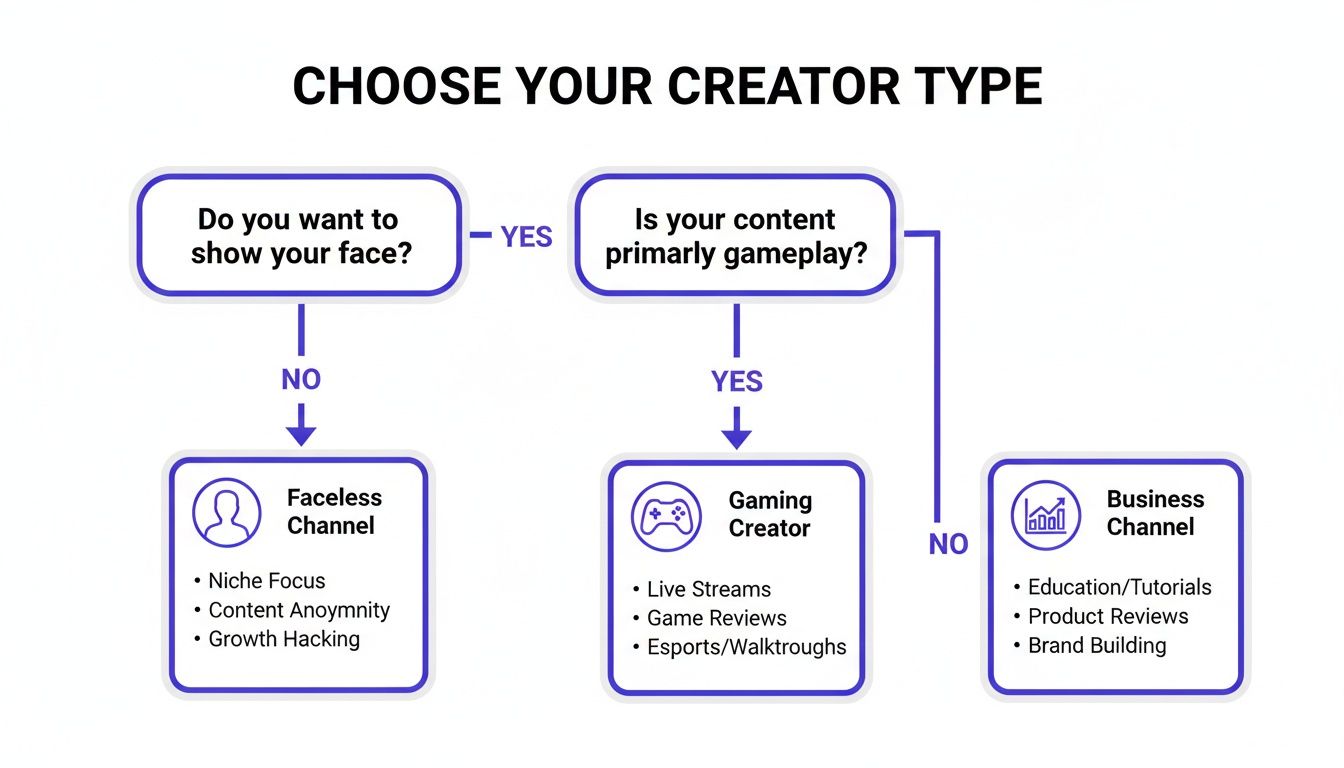 Caption: This decision framework helps creators identify the most impactful automation tools based on their content style and workflow.
A faceless channel benefits from batch production tools, while a business channel gets more value from data reporting and analytics automation.
The Three-Point Safety Checklist
Before connecting any tool to your channel, run it through this check.
- Authentication Method: How does it log in?
- Safe: The tool uses an official Google sign-in page to grant specific permissions (OAuth 2.0). You never provide your password directly.
- Unsafe: The tool asks for your Google username and password on its own website. This is a critical security risk.
- Data Privacy and Processing: Where does your content go?
- Safe: The tool is client-side, running in your browser or on your computer. Your raw video files and channel data are never uploaded to a third-party server.
- Unsafe: The tool requires you to upload source files to its servers, often with vague privacy policies.
- Core Functionality: What does it do?
- Safe: The tool automates repetitive tasks you would otherwise do manually, such as scheduling, transcribing, or finding video highlights. The ClickyApps Video Clipper is a client-side tool that scans files locally to find moments for Shorts; it automates editing work, not engagement.
- Unsafe: The tool promises to artificially inflate views, subscribers, or watch time. These "view bots" lead to channel termination.
Proper automation can increase revenue. One market summary found that automated channels often achieve higher RPMs, with one vendor reporting up to a 42% higher CPM after implementing data-driven strategies. You can learn more about the financial upside from recent industry analysis.
Integrating Client-Side Tools into Your Workflow
Most YouTube automation tools are cloud-based, requiring you to upload content to their servers. Client-side tools run directly on your computer, keeping your unreleased videos and channel data private.
This approach is ideal for handling sensitive content at the beginning of your workflow, before it interacts with public-facing tools like online schedulers.
 Caption: Client-side tools process video files locally on your machine, ensuring data privacy and security before content is uploaded.
When you process files locally, there are no uploads or API keys to manage, eliminating the risk of data being stored or analyzed by a third party.
A Secure Workflow for Repurposing Content
Here is a practical workflow for converting a long-form video into Shorts using a client-side tool like the ClickyApps Video Clipper. Your master video file never leaves your hard drive.
- Load Video: Drag your video file from your computer into the tool.
- Set Clipping Rules: Define clip parameters, such as a length between 30 and 60 seconds and a silence threshold of -40 dB.
- Process Locally: The tool scans the file on your machine and identifies clips based on your rules.
- Format for Shorts: Each clip is automatically reframed to the 1080x1920 vertical format.
- Export Securely: Save the finished clips to your computer with no quality loss.
This entire process occurs offline. It is the most secure first step in a content repurposing pipeline. You can pair local processing with the best video to text converter tools to generate transcripts simultaneously.
After generating captions, run them through a dedicated transcript cleaner tool to remove awkward punctuation and formatting before publishing.
Common Mistakes & Fixes
Integrating YouTube automation tools can increase efficiency, but common errors can negate the benefits. These tools are assistants, not replacements for creative judgment.
Issue → Fix Format
- Issue: Relying on automation for 100% of scriptwriting and editing produces generic content, causing viewer retention to drop below 30% in the first minute.
- Fix: Use a hybrid approach. Automate the first draft or rough cut, but ensure a human performs the final pass for fact-checking, personality, and narrative flow.
- Issue: Using tools that require direct entry of your Google password instead of secure login protocols.
- Fix: Exclusively use tools that use OAuth 2.0 for authentication and connect via the official YouTube API. This grants specific permissions without exposing your password.
- Issue: Automating all comment responses, which makes the channel feel impersonal and reduces community loyalty.
- Fix: Use moderation tools to filter spam and auto-hide comments with blacklisted keywords. Dedicate 15-30 minutes daily to manually reply to genuine comments and questions.
Frequently Asked Questions
Here are direct answers to common questions about implementing YouTube automation.
Can YouTube detect automation tools?
YouTube effectively detects and penalizes tools that violate its terms, such as bots that generate fake views or subscribers. These services create unnatural activity patterns and often require direct password access. Legitimate tools that use YouTube's official API for tasks like scheduling, comment management, or analytics are compliant and function within platform rules.
What is the difference between a fully automated and a hybrid channel?
A fully automated channel uses a chain of tools to handle the entire content lifecycle with minimal human intervention. A hybrid channel, which is more common and effective, uses automation for repetitive tasks while a human handles quality control, final edits, and strategic decisions. For example, a tool generates a script draft, but the creator finalizes it and records the voiceover.
How much time can I realistically save?
You can realistically reclaim 5 to 15 hours per week. The savings come from offloading high-volume, low-creativity tasks. For example, batch-scheduling a month of Shorts takes 30 minutes with a tool, versus daily manual uploads. Generating and cleaning captions with a tool takes under 5 minutes, compared to 45 minutes manually.
What are the best tools for repurposing content for TikTok and Instagram?
The best tools are client-side clippers that can scan long videos and automatically extract short, high-engagement moments. Look for features like silence detection, aspect ratio conversion (to 9:16), and batch processing. These allow you to turn one hour of footage into 10-20 platform-ready clips in under 30 minutes.
Should I automate my thumbnail creation?
Automate the templating, not the final design. Use tools to create a consistent brand template with your logo, fonts, and color palette. However, the key elements—the image, headline, and emotional hook—should be manually selected and customized for each video to maximize click-through rate (CTR). Full automation often leads to generic thumbnails that underperform.
Ready to build a smarter, more secure workflow? The ClickyApps toolkit is built for creators who want to automate clipping, captioning, and optimizing videos right on their own computer—your data is never uploaded. Start saving time today.
Related Tools