A well-written script for YouTube videos helps creators increase audience retention and reduce production time. A structured script gives your content a clear framework, ensures you land the hook in the first 8-15 seconds, and improves on-camera delivery. Following a script can cut your production time by up to 25% while directly improving viewer engagement metrics.
Table of Contents
Explore more guides in our Video Creation Hub
Quick Start: 5-Step Scripting Workflow
This workflow moves a video concept from a raw idea to a shoot-ready script in under 60 minutes.
- Set One Measurable Goal: Define a specific outcome (e.g., gain 100 subscribers, drive 50 clicks to a product page, achieve 60% average view duration).
- Brainstorm & Outline (15 Minutes): Set a timer. List all talking points, then group them into a three-part structure: Hook, Value, and Call-to-Action (CTA).
- Write the Hook First: Write the first 8-15 seconds using a proven formula like Problem-Agitate-Solve (PAS) to secure viewer attention immediately.
- Draft the Body Conversationally: Write the main content using short sentences and plain language. Read it aloud to ensure it sounds natural.
- Add a Specific CTA: End with a direct instruction tied to your goal. Instead of "check the description," use "Click the first link to download the free checklist."
The Core Structure of a High-Performing Script
A script is the architectural plan for your video. Creators who script their content see measurable lifts in key metrics because a script forces intentionality with every word and visual cue.
 Caption: A structured script directly correlates with higher audience retention by providing a clear and engaging viewer journey.
The objective is to guide the viewer from the hook to the final CTA. This journey is built on a simple framework: a strong Hook, a valuable Body, and a clear Call-to-Action (CTA).
The Hook (First 3-8 Seconds)
You have 3-8 seconds to convince a viewer to keep watching. Your hook must answer the viewer's question: "What's in this for me?" It must spark curiosity, frame a problem, or make a bold promise.
A strong hook can reduce initial viewer drop-off by up to 40%, significantly impacting how many viewers pass the critical 30-second mark.
| Formula |
Description |
Platform-Specific Example (YouTube) |
| Problem-Agitate-Solve (PAS) |
State a common pain point, amplify the frustration, then promise a clear solution. |
"Your photos look dull (Problem). You've tried filters, but nothing works (Agitate). In 60 seconds, I'll show you the one tool that fixes it (Solve)." |
| "What If" / Counter-Intuitive |
Spark curiosity by challenging a common belief or presenting a surprising scenario. |
"What if the 'auto-enhance' button is actually making your photos worse? I tested it." |
| Results-First (In Medias Res) |
Show the final result at the beginning to establish credibility and promise a roadmap. |
Show a stunning, professionally edited photo. "I edited this on my phone in two minutes. Here's exactly how I did it." |
For more hook ideas, see these hook formulas that stop the scroll.
The Body (Delivering Value)
After the hook, the body of your script must deliver on the promise made. The structure depends on the video format, but the goal is to maintain momentum.
- YouTube Tutorials: Use numbered steps. This creates a predictable rhythm and simplifies complex information. Explain each distinct concept in under 90 seconds.
- Instagram Reels/TikTok: Structure around 3-5 rapid-fire tips. Use fast cuts and on-screen text for each point to maintain pace.
- Vlogs: Build the script around clear narrative turning points. This keeps the story moving forward and maintains viewer interest.
The Call-to-Action (CTA)
The CTA guides the viewer toward a specific action. Its placement is critical. A well-placed CTA can increase subscriber conversions by 15-20% compared to a generic end-screen request.
- Long-Form (10+ min): Place a mid-roll CTA around the 60-70% mark, immediately after delivering a significant piece of value.
- Short-Form (<5 min): Use a single, direct CTA at the end.
To standardize your CTAs, use a tool like the ClickyApps Description Template Builder to create consistent and effective text for every video.
Decision Framework: Word-for-Word vs. Bullet Points
Choosing between a complete script and a bullet-point outline impacts your delivery and editing time. A detailed script offers precision, reducing filming errors by 10-15%. A bullet-point outline allows for a more natural, conversational tone.
This is not about which format is better, but which tool is right for the job. Your choice depends on the video's goal, its complexity, and your on-camera comfort level.
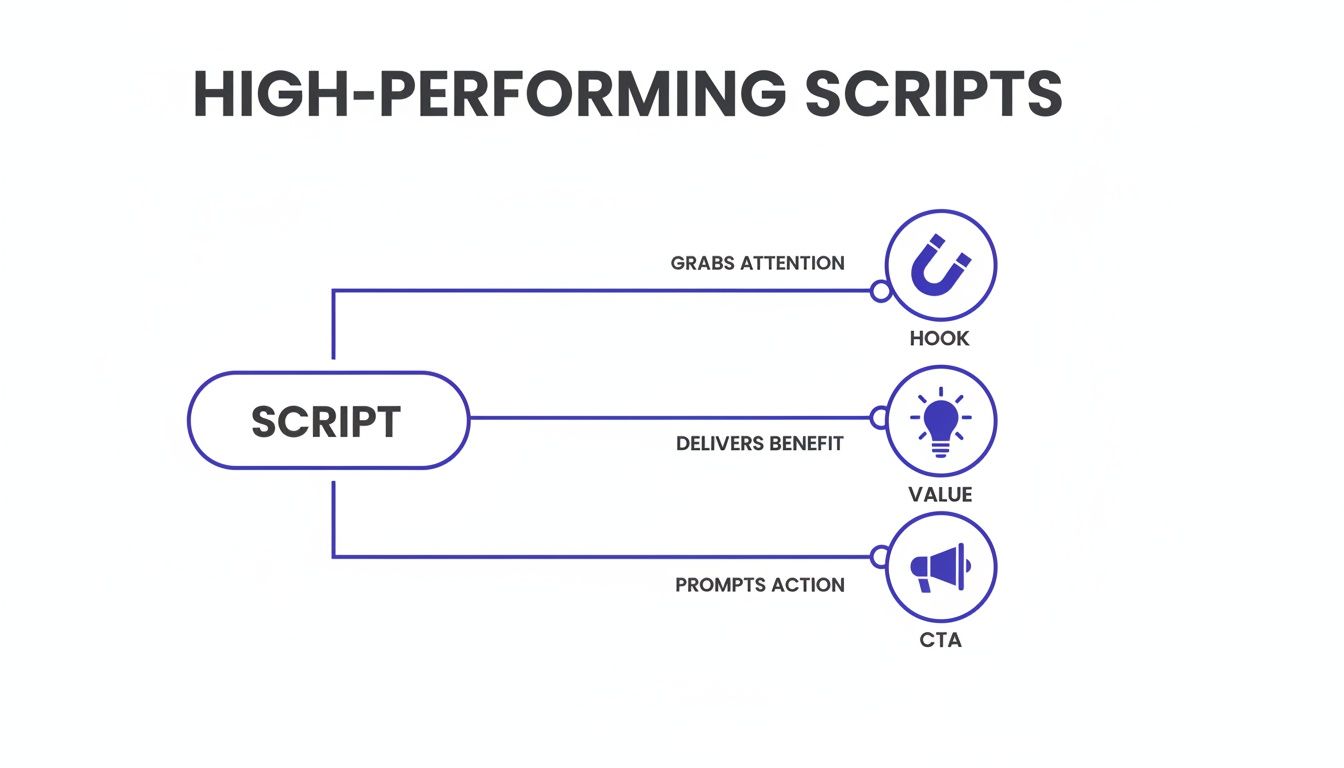 Caption: All effective scripts, whether word-for-word or bulleted, follow the fundamental Hook-Value-CTA structure.
When to Use a Word-for-Word Script
A word-for-word script includes every word, pause, and tonal note. Use this when precision is critical and every second counts.
- Technical Tutorials: When demonstrating software, a precise script prevents viewer confusion. For a tutorial on audio mixing, you can specify settings like "set the compressor threshold to -18dB with a 4:1 ratio."
- Product Reviews: For quoting performance specs or benchmarks, a full script ensures accuracy.
- YouTube Shorts/TikToks: With only 60 seconds, every word must contribute. A tight script ensures pacing is fast and the message lands before the viewer swipes. For more, see our guide on structuring and pacing Shorts.
Example Scenario: I produced a video explaining the −14 LUFS audio standard for YouTube. Scripting it word-for-word allowed me to explain technical details concisely. It cut my recording time from 45 minutes to a clean 15.
When to Use a Bullet-Point Script
A bullet-point script is a roadmap of key talking points, stats, and transitions. It provides structure while allowing for conversational delivery.
- Vlogs and Lifestyle Content: This format thrives on authentic connection. A travel vlog script might be: "1. Arrive at airport (mention flight delay), 2. First impressions of the hotel, 3. Try local food (describe taste)."
- Interviews and Podcasts: An outline lets you listen and ask follow-up questions instead of waiting for your turn to speak.
- Commentary Videos: A natural delivery builds trust. Bullet points ensure you cover all arguments in a logical order while allowing your personality to show.
Your script is a tool for SEO. Weaving in your target keywords helps YouTube's algorithm understand and rank your content. For more on this, review these 10 YouTube SEO Best Practices.
Script Templates for Different Video Formats
A template is a professional tool that aligns your message, pacing, and CTAs toward a single goal. Here are three annotated templates for different platforms.
*Caption: This video demonstrates how a structured script translates into a polished and engaging final product.*
Template 1: Educational YouTube Video (10 Minutes)
This template is for tutorials and deep dives where structure is non-negotiable.
- Hook (0:00-0:15): Start with a direct promise. "You can reduce your video editing time by 30% with one workflow. I'll show you the five steps to do it."
- Problem & Credibility (0:15-1:00): State the pain point and establish authority. "Most creators lose hours on repetitive cuts. I’ve tested 10 methods, and this one consistently delivers the fastest results."
- Main Content - Segment 1 (1:00-3:00): Introduce the first concept with on-screen text and visuals.
- Main Content - Segment 2 (3:00-5:30): Break down the second step with a real-world example.
- Mid-Roll CTA (5:30-5:45): After a value drop, place a CTA. "I've put the full checklist in a free download. The link is in the description."
- Main Content - Segment 3 (5:45-8:30): Cover the final concepts.
- Summary & Payoff (8:30-9:30): Recap key takeaways and confirm the initial promise was delivered.
- Final CTA (9:30-10:00): Give a clear, direct instruction. "Subscribe for more efficiency tips, and watch this next video on batch-processing thumbnails."
Template 2: Viral Short-Form Video (TikTok/Reels/Shorts, <60s)
Short-form content requires brutal efficiency. The goal is to achieve an Average View Duration (AVD) over 100%.
- Visual Hook (0:00-0:02): The first frame must be visually arresting. No logos or slow fades.
- Verbal Hook (0:02-0:05): One high-impact sentence. "This is the biggest mistake new creators make."
- Rapid-Fire Value (0:05-0:50): Deliver 3-5 quick tips using fast cuts, text overlays, and sound effects. Keep sentences under 10 words.
- The Loop (0:50-1:00): End with a sentence that leads back to the beginning. "...which brings us back to the biggest mistake creators make."
Template 3: Conversational Vlog (12 Minutes)
A vlog script is a narrative guide, not a word-for-word dictation. You can use existing content as a base by using a tool to convert a transcript into a structured outline.
- Opening Scene & Hook: Start in the middle of an activity to establish the day's goal.
- Inciting Incident: What kicks off the story? (e.g., a plan goes wrong, a new project starts).
- Rising Action (3-4 Key Moments): Use bullet points for main events. Note specific B-roll shots needed.
- Climax/Turning Point: The peak of the story—the problem is solved or the project is finished.
- Resolution & Reflection: Share what you learned from the experience.
- CTA & Teaser: A natural CTA followed by a hint about the next video.
Scripting is one part of the production process. Tools can accelerate your workflow; you can explore the top AI video generator tools to see current options.
Common Mistakes & Fixes
Minor script errors can cause significant viewer drop-offs. Addressing these issues can increase average view duration by 20-30%.
 Caption: Identifying and fixing common script errors before recording is crucial for maximizing audience retention.
- Issue → Writing for the Eyes, Not the Ears. The script reads like a blog post, with complex sentences and formal language that sounds robotic when spoken.
- Fix → Read every line aloud before recording. If a sentence causes you to stumble, it's too long. Shorten sentences to under 20 words and use contractions (e.g., "it's," "you'll"). Use a tool like Hemingway App to keep the reading level at or below Grade 8.
- Issue → The Overwhelming Data Dump. Cramming too much information into one section causes cognitive overload, leading viewers to click away.
- Fix → Structure your script in digestible segments. Introduce one core idea, explain it with an example, and summarize it before moving on. Keep each self-contained concept under 90 seconds.
- Issue → Burying the Hook. Wasting the first 15-30 seconds on a long intro or generic greeting causes viewer drop-off of over 50% in the first minute.
- Fix → Your first sentence must deliver a promise or spark curiosity. Start in medias res (in the middle of the action) or with a bold claim.
- Before: "Hey everyone, in this video, we're going to talk about photo editing techniques."
- After: "This one slider can fix 90% of your dull photos in less than five seconds."
- Issue → Vague or Missing Call-to-Action. The video ends abruptly or with a generic "like and subscribe," losing a key opportunity for engagement.
- Fix → Integrate a specific, contextual CTA. Tell the viewer exactly what to do and why it benefits them. "To implement this workflow, download the checklist I used by clicking the first link in the description." The ClickyApps Description Template Builder helps create and save these reusable CTAs.
Frequently Asked Questions (FAQ)
1. How long should a script be for a 10-minute video?
A script for a 10-minute video should be between 1,300 and 1,500 words. This is based on an average speaking rate of 130-150 words per minute (WPM). Time yourself reading a 150-word paragraph to determine your personal WPM and adjust accordingly.
2. How do I integrate SEO keywords naturally?
Place your primary keyword in your title and say it within the first 15 seconds. Use secondary keywords as subheadings for your main talking points. Mention the primary keyword 3-5 times throughout a 10-minute script.
3. How do I make my script sound less robotic?
Write like you speak. Use contractions ("it's," "don't"), keep most sentences under 20 words, and read the entire script aloud. If a line feels awkward to say, rewrite it until it flows naturally.
4. Should I script my YouTube Shorts and TikToks?
Yes. A script is more critical for short-form content. With less than 60 seconds, there is no room for rambling. A word-for-word script allows you to engineer the pace precisely, which is key to driving the average view duration past 100% through loops.
5. How do I turn a blog post into a video script?
Do not copy and paste. Use the blog's H2 and H3 headings as your video outline. Rewrite dense paragraphs into short, conversational sentences. Create a new, verbal hook for the first 3-8 seconds and add notes for visual elements like B-roll and on-screen text.
Related ClickyApps Tools:
- YouTube Title Generator
- Video Idea Generator
- Thumbnail Preview Tool
- Description Template Builder
- Channel Name Generator
- Tag Extractor