This guide helps working content creators (YouTube, TikTok, Instagram) set predictable budgets for video editing. You will learn how to choose the right pricing model, understand what drives costs, and negotiate contracts effectively. Getting this right eliminates budget surprises and builds a reliable post-production workflow.
Table of Contents
Explore more guides in our Video Creator Hub →
Quick Start: Setting Your Editing Budget
- Define Your Content: Is it a 10-minute YouTube tutorial or a 30-second TikTok clip? Be specific about the final length and platform.
- Assess Complexity: Is it a simple "talking head" edit or does it need motion graphics, color grading, and VFX?
- Choose a Pricing Model: Use the flowchart below. For unpredictable projects, use hourly. For defined scopes (e.g., weekly YouTube videos), use per-project. For high, consistent volume, use a monthly retainer.
- Estimate Your Cost: Use the rate tiers based on editor experience. A standard 10-minute YouTube video from a mid-level editor typically costs between $500–$2,000.
- Draft a Clear Brief: Document deliverables, revision rounds (e.g., "two rounds of minor revisions"), and deadlines. A clear brief reduces editor guesswork and can lower costs.
Choosing the Right Pricing Model for Your Project
Selecting a pricing model is not just a cost calculation; it is about matching the payment structure to project demands. Each of the four common models—hourly, per-project, day rate, and retainer—has specific strengths based on your workflow, content type, and need for budget predictability.
This decision tree provides a framework for choosing a model based on project predictability, scope definition, and content consistency.
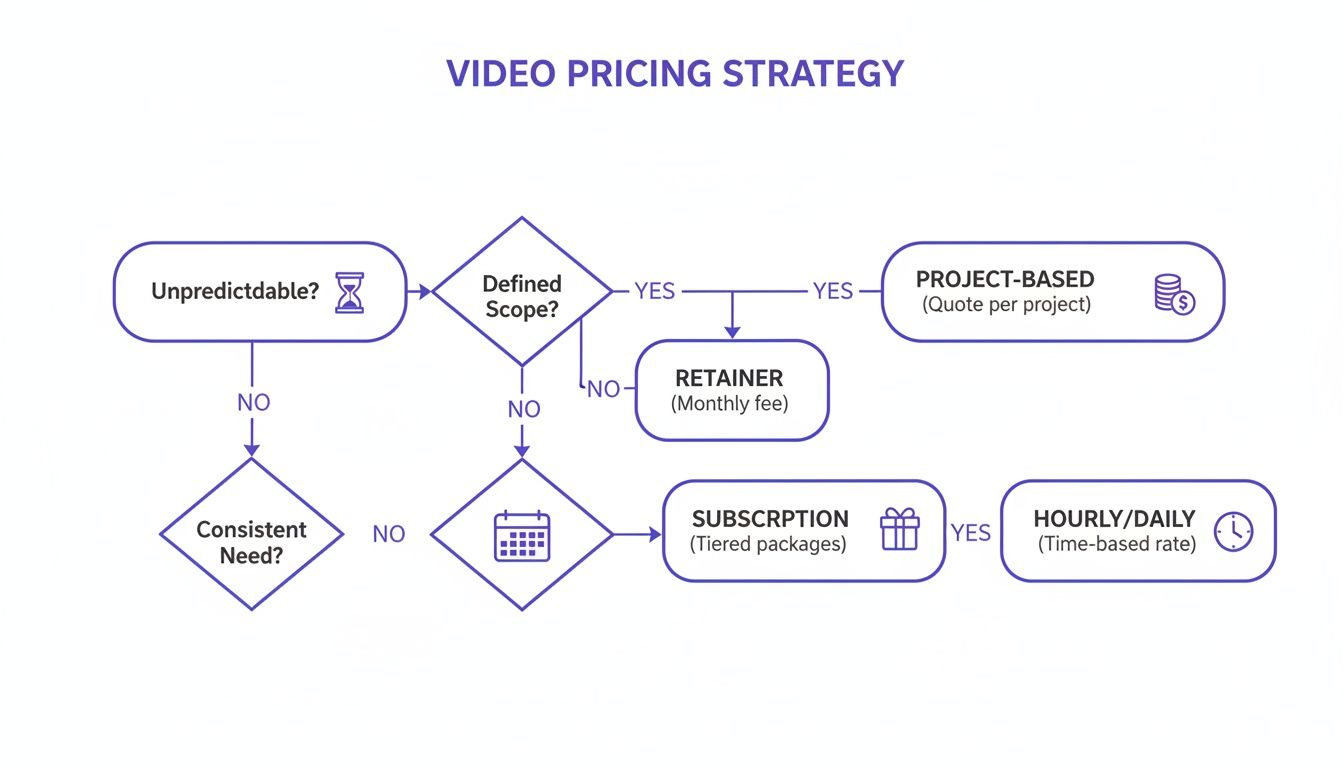 Caption: This flowchart shows how to select a pricing model. Unpredictable projects suit hourly rates, defined scopes fit per-project fees, and ongoing work is best for retainers.
As the flowchart indicates, unpredictable projects are a match for hourly rates. Projects with a clear scope work well with per-project fees, and if you have ongoing work, a retainer is the most efficient choice.
Hourly Rates: For Unpredictable Work
An hourly rate is best for projects with an undefined scope or those requiring extensive, rapid feedback. This model offers the most flexibility for tasks where estimating total effort upfront is difficult.
- Best For: Experimental YouTube Shorts, quick-turnaround TikToks, or projects involving real-time feedback.
- Real-World Example: I tested a new format for Instagram Reels and needed an editor for 2-3 hours to experiment with different cuts, music, and caption styles. Paying by the hour provided flexibility without a fixed project commitment.
The primary drawback is budget uncertainty. Without tight project management, costs can escalate, particularly if revision rounds are not well-defined.
Per-Project Fees: For Defined Scopes
A per-project fee is the industry standard for content creators because it offers cost certainty for a specific set of deliverables. This makes it ideal for routine content, such as a weekly YouTube video.
- Best For: A standard 10-minute "talking head" YouTube video, a structured tutorial, or any content with a repeatable format.
- Real-World Example: For a weekly 12-minute podcast video, a per-project fee of $750 covers the edit, one revision round, basic color correction, and final export. This ensures my costs are predictable each week.
Day Rates: For On-Location And Intensive Sessions
A day rate is used when you need to book an editor for a full day of dedicated time. This is common for on-location shoots or intense, time-sensitive projects requiring immediate attention.
- Best For: On-site event coverage editing, batch-recording sessions for multiple videos, or a high-stakes launch video requiring immediate revisions.
- Real-World Example: During a three-part online course shoot, I hired an editor on a day rate of $600. This ensured they were on set to assemble rough cuts immediately after each module was filmed, keeping the production on schedule.
Monthly Retainers: For Consistent Content Output
A monthly retainer is a recurring fee that secures a set amount of an editor's time or a specific number of videos each month. For creators with a high-volume, consistent publishing schedule, this is the most cost-effective model.
- Best For: Creators requiring a fixed number of videos edited weekly, such as 4 long-form YouTube videos and 12 shorts per month.
- Real-World Example: A $3,000 monthly retainer guarantees delivery of four 15-minute videos and sixteen vertical clips on a fixed schedule. This provides both predictable costs and a reliable production partner.
To ensure a smooth retainer relationship, use the best tools for content creation to optimize your workflow.
Decision Framework: Hourly vs. Per-Project vs. Day Rate vs. Retainer
| Pricing Model |
When to Use It |
Pros |
Cons |
| Hourly Rate |
Projects with undefined scope, quick turnarounds, or experimental content (e.g., testing new TikTok formats). |
Maximum flexibility; pay only for time worked. |
Budget uncertainty; costs can escalate without tight management. |
| Per-Project Fee |
Clearly defined projects with a repeatable format, like weekly YouTube videos or sponsored Instagram posts. |
Cost certainty; budget is fixed upfront. |
Less flexible; scope changes often require renegotiation and additional fees. |
| Day Rate |
On-location shoots, intensive editing sessions, and time-sensitive projects requiring immediate turnaround. |
Secures dedicated, exclusive time from the editor for a full 8-hour day. |
Can be inefficient if the full day is not used effectively. |
| Monthly Retainer |
Creators with a high and consistent volume of content, such as 4+ videos per month. |
Cost-effective for high volume; builds a strong partnership. |
Requires a consistent need; inefficient if your content output dips. |
The right pricing model aligns the editor's compensation with the value they provide and your specific workflow.
How Editor Experience and Skills Affect Pricing
An editor's rate directly reflects their experience, technical skills, and creative problem-solving ability. Understanding the different tiers helps you budget correctly—so you avoid overpaying for simple tasks or underinvesting in critical projects.
 Caption: Different pricing models reflect an editor's experience and the complexity of the project, from basic cuts to advanced visual effects.
Hiring a senior editor for basic jump cuts is inefficient, while assigning a high-stakes channel trailer to a beginner can compromise its impact. The market sorts editors into tiers based on deliverable quality.
Entry-Level Editors ($25 - $40/hour)
An entry-level editor handles foundational, repetitive post-production tasks. They are proficient with basic software functions and are suited for high-volume work where creative direction is already established.
Their skill set focuses on execution:
- Basic Assembly: Trimming and sequencing clips.
- J-Cuts and L-Cuts: Implementing standard transitions for smooth dialogue flow.
- Audio Leveling: Ensuring consistent volume, targeting −14 LUFS for YouTube or -16 LUFS for Spotify.
- Simple Graphics: Applying pre-made title cards or lower thirds from a template.
Mid-Level Editors ($40 - $75/hour)
A mid-level editor contributes to the video's narrative and pacing. They possess stronger creative instincts and technical skills, making them ideal partners for established creators who need consistent, quality weekly uploads.
In addition to entry-level skills, they handle:
- Pacing and Storytelling: Shaping a narrative and selecting the best takes to maintain viewer engagement.
- Basic Color Correction: Adjusting exposure, contrast, and white balance for a clean, professional look.
- Sound Mixing: Layering dialogue, music, and basic sound effects.
- Simple Motion Graphics: Creating basic custom text animations or transitions.
Senior and Specialist Editors ($75 - $150+/hour)
A senior editor combines artistic vision with technical mastery. They often specialize in a specific craft like cinematic color grading, visual effects (VFX) in After Effects, or immersive sound design.
These experts are hired for their mastery in:
- Advanced Color Grading: Creating a specific mood or cinematic look.
- Complex Motion Graphics: Designing intricate animated sequences or data visualizations.
- VFX and Compositing: Seamlessly integrating digital effects with live-action footage.
- Advanced Sound Design: Building a rich, immersive soundscape.
You hire a specialist for your most important projects: a new channel trailer, a high-value sponsored video, or a documentary-style feature. For more foundational knowledge, our guide on video editing tips for beginners can be a useful starting point.
Where Your Editor Lives Matters More Than You Think
An editor's location can significantly impact your budget. Understanding regional rate differences allows you to balance quality, speed, and cost efficiency. One editor’s rate can differ from another’s based purely on their local cost of living and market demand.
Global Rate Tiers
Freelance video editor rates are tied to local economies, creating distinct pricing tiers. A senior editor in Los Angeles may charge significantly more than a similarly skilled editor in Eastern Europe.
Here is a breakdown of typical hourly rates by region:
- North America (USA & Canada): $50 – $150 per hour. Driven by high living costs and demand.
- Western Europe (UK, Germany, France): $40 – $120 per hour. Competitive rates, especially in media hubs like London.
- Eastern Europe (Poland, Romania, Ukraine): $25 – $60 per hour. Offers a strong balance of technical skill and lower costs.
- South Asia (India, Philippines, Pakistan): $15 – $40 per hour. Most affordable rates, suitable for high-volume, standardized tasks.
Strategic outsourcing can reduce post-production costs by 40-60%. To further manage costs, ensure audio standards are met from the start. Using a LUFS Analyzer to hit the correct loudness target (e.g., -14 LUFS for YouTube) can reduce revision rounds by up to 30%, saving billable hours.
Decision Framework: Local vs. Global Hiring
The choice between a local and global freelancer depends on your project's specific needs for workflow, communication, and creative alignment.
Hire Locally When:
- You're on a Tight Deadline: Projects requiring real-time collaboration or same-day turnarounds benefit from a shared time zone.
- The Content is Culturally Nuanced: Local humor or specific cultural references require an editor with local context.
- You Need Someone On-Site: For live events or studio work, an in-person editor is necessary.
Hire Globally When:
- Budget is the Top Priority: High-volume content with a repeatable format is ideal for cost-effective global talent.
- Your Timeline is Flexible: A 24-hour feedback loop, where you send notes at your EOD and receive revisions the next morning, can be highly efficient.
- You Need a Niche Specialist: The global talent pool offers access to experts in specific areas like advanced VFX or niche animation styles.
Building a Rate Sheet and Calculating Project Costs
A well-structured rate sheet translates an editor's hourly rate into clear, predictable project costs. It defines deliverables and prevents scope creep, allowing you to budget accurately and compare editors based on the value they offer.
 Caption: A rate sheet helps calculate project costs by bundling services into packages based on an editor's hourly rate and estimated time per task.
How Editors Establish Their Base Rate
An editor's target hourly rate is calculated based on their business realities, not arbitrary numbers.
The formula is: (Desired Salary + Annual Overhead) / Annual Billable Hours = Target Hourly Rate.
- Desired Annual Salary: The editor's target income.
- Overhead Costs: Annual business expenses like software subscriptions (Adobe Creative Cloud at $600/year), hardware, and insurance.
- Billable Hours: A realistic estimate is 1,000-1,200 hours per year, accounting for admin and marketing time.
This calculation is fundamental to a sustainable freelance business. You can learn how to calculate your ideal hourly rate for a more detailed breakdown.
From Hourly Rate to Fixed-Price Packages
Editors translate their hourly rate into fixed-price packages by estimating the time required for standard projects. For example, if an editor's rate is $65/hour and a standard YouTube video takes 10 hours, the base package price is $650. Specific deliverables are then bundled into this package.
Sample Rate Sheet Templates
Here are three common package structures used by editors who work with content creators.
1. Social Media Starter Package ($750 - $1,500)
Ideal for creators producing high-volume, short-form content for TikTok, Reels, and Shorts.
- Deliverables:
- 10 edited short-form videos (up to 60 seconds each).
- Dynamic captions using brand-approved fonts.
- One round of minor revisions per video.
- Trending audio suggestions.
- Export in 1080x1920 at 30 FPS.
2. Standard YouTube Package ($600 - $2,000)
The core offering for long-form creators producing weekly or bi-weekly content.
- Deliverables:
- One edited long-form video (8-12 minutes final runtime).
- Color correction and audio mixing (to -14 LUFS standard).
- Basic motion graphics (intro/outro, lower thirds).
- One custom thumbnail asset (PSD or JPG).
- Two rounds of revisions.
- Export in 1920x1080 or 3840x2160 (4K).
3. Educational Content Package ($1,200 - $3,500+)
For creators producing complex instructional videos like online courses or multi-camera tutorials.
- Deliverables:
- One multi-camera educational video (up to 20 minutes).
- Syncing of all camera angles and audio sources.
- Integration of screen recordings and presentation slides.
- Custom-animated callouts.
- Three rounds of revisions for instructional accuracy.
Essential Contract Clauses and Negotiation Strategies
A contract is the blueprint for your project. It provides clarity, protects both parties, and sets clear expectations to ensure a smooth workflow. A solid agreement prevents scope creep, unexpected costs, and disputes over deliverables.
Non-Negotiable Contract Clauses
Every agreement should include these four clauses to establish a professional framework.
- Scope of Work (SOW): Be precise. Instead of "a video," specify "one 8-10 minute YouTube video, one custom thumbnail in PSD format, one SRT caption file, and one 30-second vertical clip for social media, delivered in 1920x1080 MP4 format."
- Revision Policy: Define a "revision round" and state the number included (e.g., "two rounds of minor revisions"). Specify that major changes, such as re-ordering the narrative structure after the first cut, will be billed at an hourly rate.
- Payment Terms: Outline the payment schedule. A standard structure is 50% upfront and 50% upon final delivery. State payment terms, such as "Net 15," meaning the invoice is due within 15 days.
- Kill Fee: This clause protects the editor if a project is canceled mid-way. A standard kill fee is 25-50% of the total project cost to compensate the editor for work already completed.
Smart Negotiation Tactics
Negotiation is about finding the best value, not just the lowest price.
- Bundle Projects: Propose a package deal for multiple videos. Ask for a 5-10% discount for committing to a batch of four YouTube videos or a monthly retainer for consistent short-form content.
- Provide a Detailed Brief: A clear brief with timestamped notes, b-roll requests, and links to reference videos reduces editor guesswork. This efficiency can justify a more favorable rate.
- Organize Your Assets: A cleanly labeled folder structure with all footage, graphics, and audio can save an editor 1-2 hours of prep time. This demonstrates professionalism and respect for their time. Using a tool like our Transcript Cleaner to provide a polished script is another way to streamline the workflow.
Common Mistakes & Fixes
Avoid these common pitfalls to ensure your collaboration with a freelance editor is efficient and predictable.
- Issue → Vague Project Brief: Your brief says "make this look cool," leading to endless revisions because the editor is guessing your vision.
- Fix → Provide a Concrete Brief: Include links to 2-3 specific reference videos, timestamped notes for key edits (e.g., "at 0:45, add a zoom-in on the product"), and hex codes for brand colors.
- Issue → Undefined Revision Rounds: You keep asking for "one more small change," causing scope creep and blowing your budget.
- Fix → Define Revisions in the Contract: Specify "two rounds of minor revisions are included." Define a minor revision as a tweak taking less than 15 minutes (e.g., changing a lower third). Anything more is a major revision billed hourly.
- Issue → Disorganized Asset Delivery: You send footage via ten separate WeTransfer links with generic file names like
final_final_v2.mp4.
- Fix → Use a Structured Folder System: Create a single project folder in Google Drive or Dropbox with subfolders:
01_A-Cam, 02_B-Cam, 03_Audio, 04_Graphics. This can save an editor 1-2 hours of prep time.
- Issue → Ignoring Platform-Specific Needs: You ask for one video file to post on YouTube, Instagram, and TikTok.
- Fix → Specify Deliverables per Platform: Request specific exports in the SOW: one 16:9 file for YouTube, one 1:1 or 4:5 for Instagram Feed, and one 9:16 for Reels/TikTok/Shorts.
Frequently Asked Questions
What does a standard "revision round" include?
A standard revision round typically includes minor changes that do not alter the video's core structure. This covers tasks like swapping a B-roll clip, adjusting the timing of a graphic, changing a music track, or fixing a typo in a title card. It does not cover major changes like re-ordering the story or requesting new animations not in the original scope.
What is a typical rush fee for urgent video edits?
A standard rush fee is 25% to 50% of the total project cost for faster-than-normal turnarounds (e.g., 24-48 hours). For an extreme deadline, such as a same-day or overnight request, this fee can increase to 100%. Always agree on this in writing before work begins.
Do editors charge for sourcing stock footage and music?
Yes. The time an editor spends searching stock libraries, licensing assets, and organizing them is billable work. Some may include a set amount of sourcing time (e.g., "up to 60 minutes") in their project fee. The cost of the license for the footage or music is a separate expense covered by the client.
How should I budget differently for TikTok vs. YouTube videos?
Budgeting differs based on platform format and complexity.
- For TikTok/Shorts: Budget for volume and speed. Edits are faster but require consistency. A per-project fee of $50–$200 per video is common. A monthly retainer is often most cost-effective.
- For YouTube: Budget for quality and storytelling. Edits are more complex and time-consuming. A per-project fee is standard, ranging from $400 to $1,500 for a polished 8–12 minute video.
Does an editor's software choice (e.g., Premiere Pro vs. DaVinci Resolve) affect their rates?
No, an editor's choice of professional software (Adobe Premiere Pro, DaVinci Resolve, Final Cut Pro) does not directly affect their rates. Rates are based on skill, experience, and efficiency, not the specific tool used. Your focus should be on the final output and the editor's ability to meet your project's technical requirements.
How much do editors charge to add captions or subtitles?
Adding captions is typically an add-on service. Rates can be per-minute of video (e.g., $3-$7 per minute) or a flat fee per video (e.g., $50-$100 for a 10-minute video). This service includes transcribing, timing the captions (creating an SRT file), and burning them into the video if requested. Providing a clean transcript yourself can reduce this cost. Our guide shows how to find quotable moments from long videos, which can help streamline this process.
Related Tools from ClickyApps
- LUFS Analyzer: Ensure your audio meets platform standards like YouTube's -14 LUFS to avoid revision costs.
- Transcript Cleaner: Provide a clean, accurate transcript to your editor to save time and money on captioning.
- Thumbnail Previewer: Test how your thumbnail will look on different devices before publishing.
- Aspect Ratio Converter: Quickly reformat videos for different platforms like YouTube (16:9) and TikTok (9:16).